If you already run backups, you might assume your data is safe. That assumption is where a lot of businesses get caught out. Backup, disaster recovery, and cyber recovery sound like three names for the same thing, but they solve different problems, and knowing which one covers which gap is the difference between a bad afternoon and a bad quarter. Cyber recovery in particular has become its own discipline because ransomware changed the rules, and the old “we have a copy somewhere” approach no longer holds up when the attacker went looking for that copy first.
This matters more than it used to. A commissioned study by analyst firm Omdia found that 83% of organizations were hit by a successful ransomware attack in the past two years, and only 39% managed to recover at least 75% of their data afterward, down from 57% two years earlier. Recovery is getting harder, not easier, so it pays to be clear on what each layer of protection actually does.
Why Backup, Disaster Recovery, and Cyber Recovery Are Not the Same
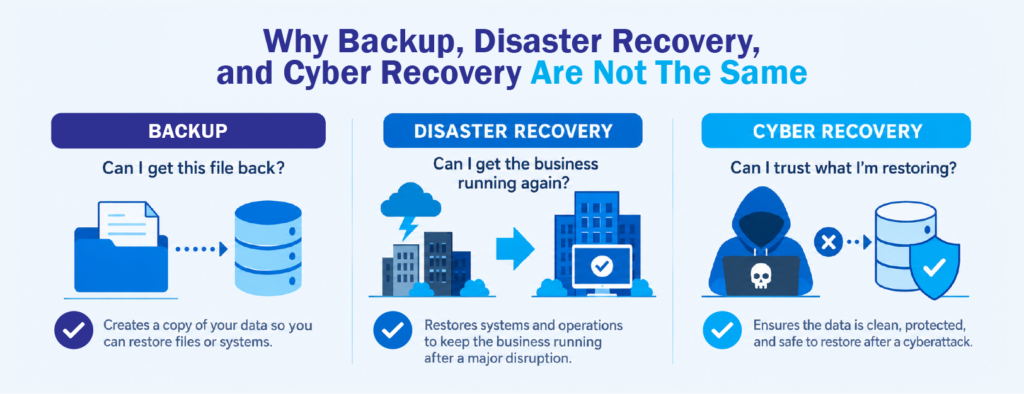
The confusion usually starts because all three end with the same goal: your data and systems come back. The reason they exist separately is that they were built to handle very different kinds of trouble. Backup answers the question, “Can I get this file back?” Disaster recovery answers, “Can I get the whole business running again?” And cyber recovery answers a harder one, “Can I trust what I’m restoring?”
Think about it this way. A backup assumes the copy you saved is clean and ready to use. Disaster recovery assumes the disruption was accidental, like a flood, a power outage, or a failed server, and that your last good copy can be trusted. Ransomware breaks both assumptions. Attackers now go after backup repositories on purpose, and many sit quietly inside a network for weeks before triggering, which means the “clean” copy you planned to restore might already be compromised. That is why treating cyber recovery as just another word for backup can leave a real hole in your plan.
The 3 Layers of Data Protection, Explained
It helps to picture these as three layers that stack on top of each other rather than as competing options. Here is what each one covers.
- Backup is a copy of your data kept somewhere else so you can restore it after deletion, corruption, or hardware failure. It is the foundation, and every good strategy starts here. On its own, though, a backup does not guarantee your business keeps running, and it does not check whether the data inside is safe to bring back.
- Disaster recovery is the plan and infrastructure that get your systems, applications, and operations back online after a major disruption. This is where recovery time objectives (RTO) and recovery point objectives (RPO) come in, setting how fast you need to be running again and how much data you can afford to lose. A disaster recovery plan usually leans on backups plus replication or a secondary site, but it is built around the idea that the failure was random and the data is trustworthy.
- Cyber recovery is the layer designed specifically for attacks. It assumes someone deliberately targeted you and may have tampered with your backups, so it adds isolation, immutable backups that cannot be altered or deleted, and validation to confirm the recovery point is clean before it goes back into production. Cyber recovery is less about speed for its own sake and more about restoring with confidence, so you do not reintroduce the same infection you just cleaned out.
The short version is that backup gives you a copy, disaster recovery gives you continuity, and cyber recovery gives you a copy you can actually trust after an attack.
Where Most Recovery Plans Fall Short
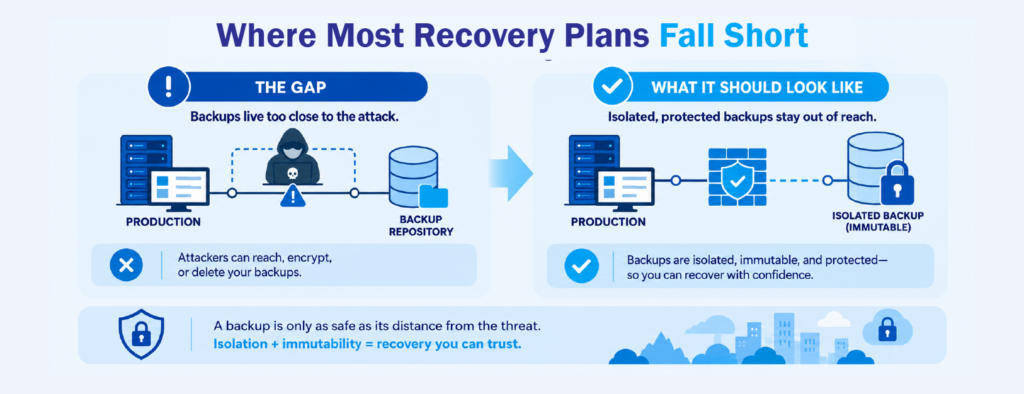
The most common gap is believing that having backups equals being recoverable. Those are not the same thing. A backup that runs every night is useless if it lives on the same network the ransomware spread through, or if nobody has tested a restore in a year. Plenty of businesses only discover their backups were incomplete or infected at the worst possible moment, during an actual recovery.
Another gap shows up in how backups are protected. If an administrator account can delete or overwrite your backups, then an attacker who steals that account can too. This is why immutable backups have become such a talking point. When a copy genuinely cannot be modified or deleted, even by a privileged user, it holds its value as a last line of defense.
The catch is that not every product labeled “immutable” behaves the same way in practice, so it is worth understanding how your solution actually enforces it rather than taking the label at face value. National guidance points the same direction. The U.S. Cybersecurity and Infrastructure Security Agency (CISA) recommends maintaining offline, encrypted, and regularly tested backups as part of any serious ransomware defense.
When You Need All Three
For a small operation with simple systems, solid backups and a basic disaster recovery plan may cover most of the realistic risks. The moment your business depends on systems being available, though, or you handle data that would hurt to lose or expose, the case for cyber recovery gets stronger. Regulated industries, healthcare, finance, and any company that would grind to a halt during a multi-day outage should assume ransomware is a “when,” not an “if,” and plan the recovery side accordingly.
You do not have to build all three at once. A sensible path is to get backups right first, make sure they are tested and protected, then formalize a disaster recovery plan around your continuity needs, and finally add cyber recovery capabilities like isolation and validation for your most critical systems. Layering them this way keeps the investment tied to real risk instead of buying everything on day one.
Building a Cyber Recovery Strategy That Holds Up
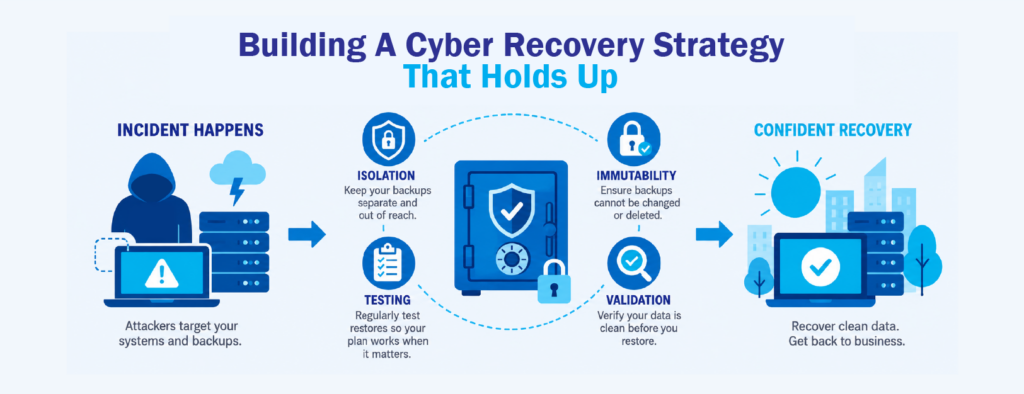
A cyber recovery strategy earns its keep in the details. Isolation keeps a protected copy separated from your production network so an attacker who gets in cannot reach it. Immutability makes sure that copy stays exactly as saved. Validation, often through scanning recovery points before restoring, gives you a reasonable basis to believe you are bringing back clean data. And regular testing turns all of it from a hopeful assumption into something you have actually seen work.
Frameworks help here too. The NIST Cybersecurity Framework includes “Recover” as one of its core functions, a reminder that getting back to normal is a planned capability, not an afterthought. The goal of a strong cyber recovery approach is not just to survive an attack but to shorten the gap between “we are down” and “we are back and we trust what we restored.” That is ultimately what keeps a disruption from turning into a lasting loss of revenue, data, and customer trust.
Where CT Link Fits In
Of course, a plan is only half of it. The tools you run it on matter just as much, and that is an area we work on closely with local businesses. Two of the solutions we work with, Acronis and Cohesity, were built with exactly these problems in mind.
Acronis brings backup and cyber protection together in one place, so instead of bolting security onto your backups after the fact, the protection and the recovery live under the same roof. That matters when you are trying to keep a clean, safe copy without stitching several products together.
Cohesity leans into the trust side of recovery. Its approach centers on keeping backup data isolated and immutable, with the ability to check whether a recovery point is clean before you bring it back, which lines up closely with the points raised earlier in this article.
There is no single right answer here, and the best fit depends on your environment, your budget, and what you are trying to protect. If you want a second opinion on where your current setup might have gaps, or you are just weighing your options, our team is happy to talk it through. No pressure, just a straight conversation about what makes sense for your business.
Interested in learning more about backup, disaster recovery, and cyber recovery? Check out our Cohesity and Acronis pages or message us at marketing@ctlink.com.ph to learn more!
This is a fascinating article! Through its explanation of the fundamental differences between *backup*, *disaster recovery*, and *cyber recovery*, it highlights that merely maintaining data copies (*backup*) is no longer sufficient to counter modern threats—such as ransomware attacks specifically targeting backup repositories.
For Industrial Engineering students at Telkom University Surabaya, this article offers highly strategic insights into **IT risk management**, cyber threat mitigation, and the design of **business continuity** strategies. When designing modern, fully digital industrial operational systems, implementing multi-layered security standards—ranging from *immutable backups* and defined recovery objectives (*RTO/RPO*) to *data validation*—is crucial for safeguarding corporate assets against financial loss and operational paralysis caused by cyberattacks or disasters.