
Storage decisions used to be simple. You bought disks, added more when you ran out, and replaced the whole array every few years. That approach is getting harder to justify as applications grow more demanding and users expect everything to load instantly. This is why more organizations across the country are weighing All Flash Storage against traditional hybrid arrays, and why the answer is no longer as obvious as it seemed a few years ago.
If your team is preparing for a storage refresh or trying to figure out whether flash is worth the investment, this comparison will walk through the practical differences that actually matter. We will look at where hybrid still holds up, but also why All Flash Storage tends to come out ahead in most modern environments once you weigh performance, cost, and day-to-day management side by side.
What Each Approach Really Means
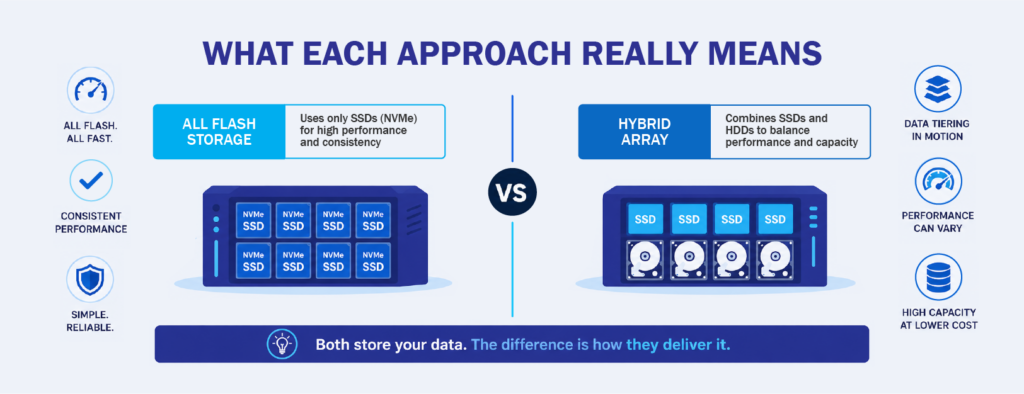
Before comparing them, it helps to know what each storage type actually does.
An All Flash Storage array uses only Solid State Drives (SSDs), most of which now rely on Non-Volatile Memory Express (NVMe), a modern protocol built for speed. Because there are no spinning disks involved, data can be read and written far faster than older systems allow. This is the same underlying technology that made laptops feel dramatically faster when they switched from hard drives to SSDs, just scaled up for business use.
A hybrid array mixes SSDs with traditional Hard Disk Drives (HDDs). The idea is that frequently used data sits on the faster SSDs, while older or less active data lives on cheaper spinning disks. It sounds efficient, and for many years it was. But this design also introduces complexity, because the system has to constantly decide which data belongs where, and performance can drop when the wrong data ends up on the slower tier.
Performance and Latency in Real-World Use
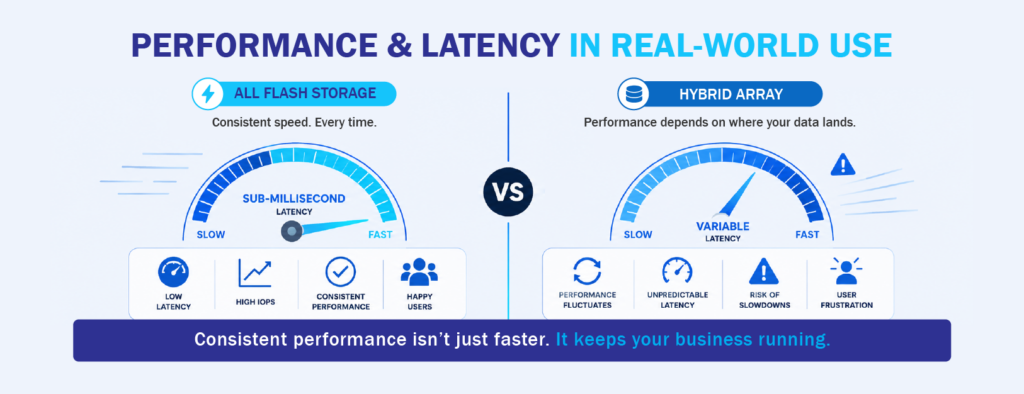
The most obvious difference between the two is speed. Flash arrays typically deliver latency in the sub-millisecond range, while hybrid systems fluctuate depending on where the requested data happens to sit. For everyday office files, the difference may not feel dramatic. For databases, virtual desktops, analytics tools, or enterprise applications with many users hitting them at once, the difference is very noticeable.
The real issue with hybrid arrays is consistency. Even if average performance looks acceptable on paper, the moments when the system reaches into the slower disk tier can cause slowdowns that users feel. Applications time out, reports take longer to generate, and backups stretch into business hours. Flash arrays remove that variability because every drive performs at the same high level.
According to research from the U.S. National Institute of Standards and Technology (NIST), storage performance has become one of the leading factors influencing application responsiveness in modern data centers. When storage becomes the bottleneck, upgrading servers or networks rarely fixes the problem.
Capacity, Scalability, and Growth
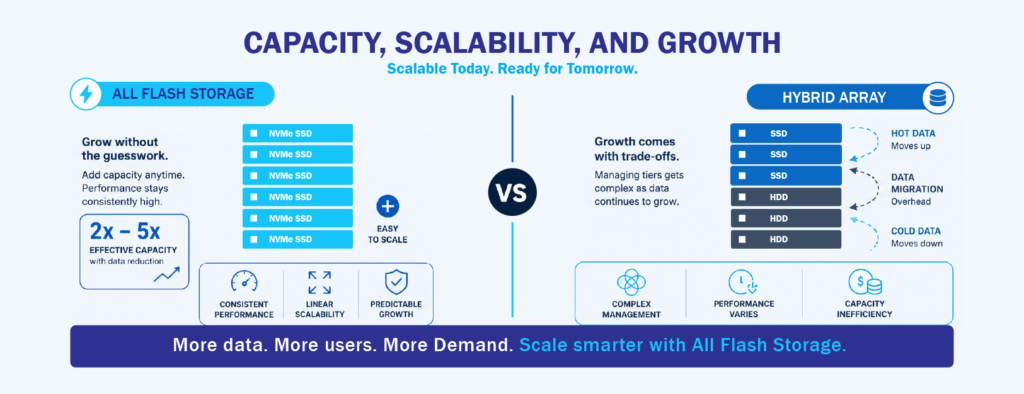
Hybrid arrays have historically held an advantage in raw capacity per peso. Spinning disks are cheaper to manufacture, so you can pack more terabytes into a hybrid system for the same upfront cost. If your workloads are archive-heavy or you store large volumes of rarely accessed data, that can still be a valid reason to consider hybrid.
However, the gap has been narrowing. Flash prices have dropped significantly over the past several years, and modern All Flash Storage platforms use data reduction features such as compression and deduplication to stretch usable capacity further. In many cases, one terabyte of flash effectively holds two to five times more real data than the label suggests. Scalability is also cleaner on flash systems because you can add capacity without worrying about balancing tiers or rebalancing data across mixed drive types.
For organizations expecting steady data growth, this matters. Planning around a hybrid system often means predicting how your data will behave, which is difficult when new applications keep changing usage patterns.
Cost Over Time vs Cost at Purchase
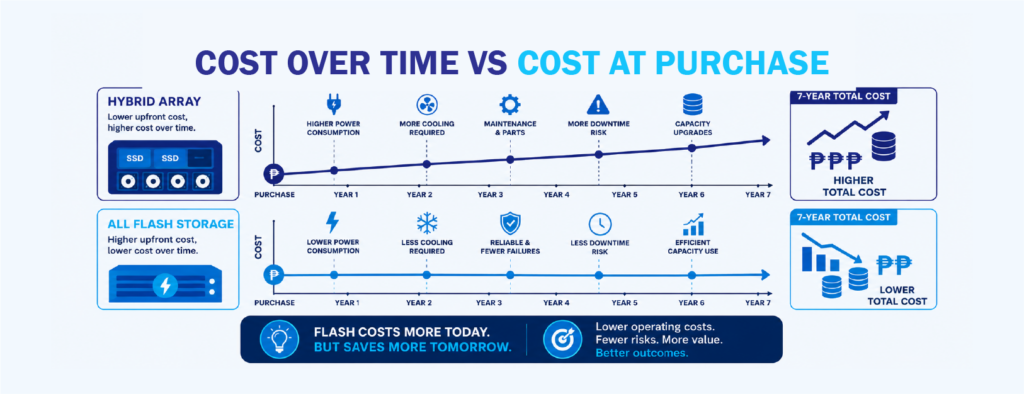
This is where many buying decisions go sideways. Hybrid arrays look cheaper on the initial quotation, but the total cost of ownership tells a different story once you factor in the full picture.
Flash arrays generally consume less power, produce less heat, take up less rack space, and require fewer drives to deliver the same performance. Over a five to seven year lifespan, these savings add up. Maintenance is also simpler because there are no moving parts to fail, which reduces both downtime and replacement costs. The U.S. Cybersecurity and Infrastructure Security Agency (CISA) has emphasized that reliable, resilient storage is a core part of operational continuity, and hardware failures remain one of the more common triggers of unplanned outages.
There is also the hidden cost of slow storage. When staff wait for systems to respond, or when applications underperform during peak hours, the impact on productivity is real even if it does not show up on an invoice. Weighing acquisition cost against these ongoing factors gives a more accurate view of value.
Operational Simplicity and Management
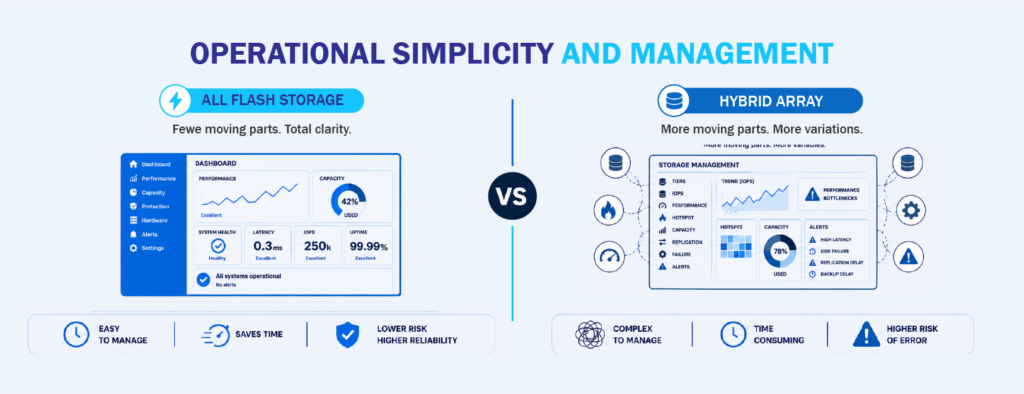
Managing a hybrid array involves more moving parts, both literally and in software. Administrators have to monitor tiering behavior, watch for hotspots, and troubleshoot performance issues that come from the interaction between fast and slow drives. When something slows down, identifying whether the cause is the drive tier, the cache, or the workload itself takes time.
Flash arrays simplify this considerably. There are no tiers to manage, no cache hit rates to chase, and performance is predictable across the board. Many modern flash platforms also come with cloud-based monitoring tools that use analytics to predict issues before they become problems. This kind of management model fits well with smaller teams that cannot afford to spend hours each week tuning storage.
Reduced complexity also lowers the risk of human error, which remains one of the leading causes of storage-related incidents according to multiple industry reports from firms like Gartner and IDC.
Reliability and Uptime
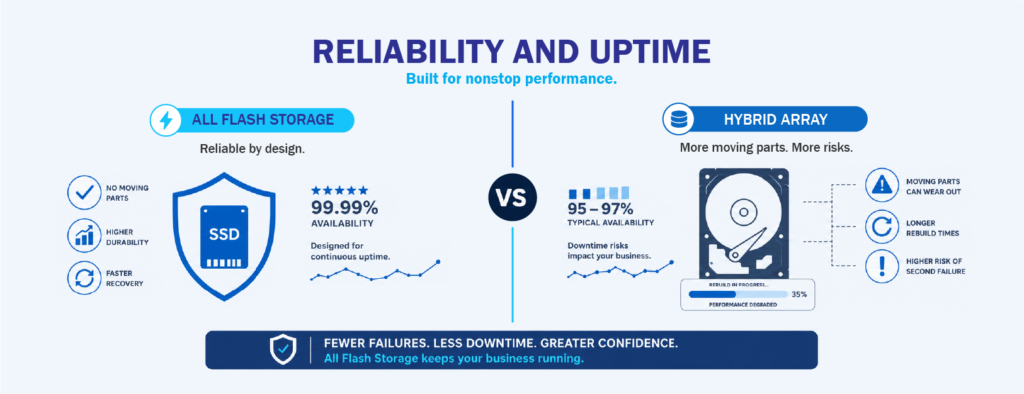
Spinning disks wear out. That is not a criticism of hybrid arrays, it is just physics. Moving parts eventually fail, and when they do, you deal with rebuild times, degraded performance during recovery, and the possibility of a second failure during that window.
Flash drives have no moving components, which translates to fewer hardware failures and faster recovery when something does go wrong. Combined with modern data protection features like snapshots and replication, flash systems tend to deliver higher effective uptime with less operational stress. For organizations running services that customers or staff depend on throughout the day, this is often the difference that carries the most weight.
Power, Cooling, and Data Center Footprint
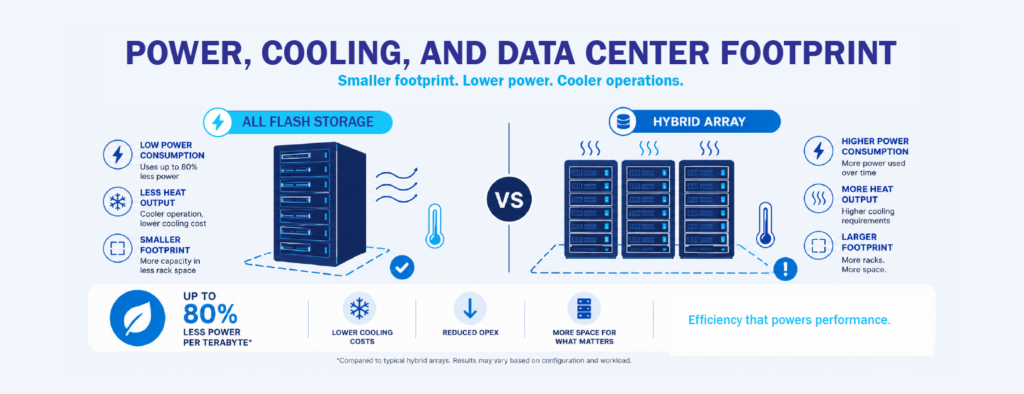
This one is easy to overlook until the electricity bill arrives. Hybrid arrays draw more power because spinning disks require constant energy to keep the platters moving, and they generate heat that has to be cooled. Multiply that across a full rack, and the operating cost adds up quickly.
Flash arrays are much more efficient. They use less power per terabyte, generate less heat, and occupy less rack space thanks to higher storage density. For businesses operating in colocation facilities where space and power are billed directly, the savings can be significant over the life of the system. It also aligns well with sustainability goals that more Philippine organizations are starting to factor into their infrastructure planning.
Fit for Modern Workloads
Not every environment needs the fastest possible storage, and being honest about workload requirements helps avoid overspending or underspending.
Hybrid arrays can still make sense for backup targets, long-term archives, media libraries, and other environments where cost per terabyte matters more than speed. If your applications are not performance-sensitive and your data grows in large, predictable volumes, a hybrid setup may serve you well.
All Flash Storage is the stronger fit for virtualization, databases, Enterprise Resource Planning (ERP) systems, healthcare records, financial platforms, analytics, and Artificial Intelligence (AI) workloads. These environments demand consistent low latency and cannot tolerate the unpredictability that hybrid systems can introduce. As more Philippine organizations modernize core applications and adopt cloud-connected services, the number of workloads that clearly favor flash keeps growing.
Making the Right Choice for Your Environment
The decision comes down to matching the storage to how your business actually runs, not to how it ran five years ago. Applications are more demanding, users expect faster responses, and downtime carries a higher cost than it used to. For most organizations planning a storage refresh in the next year or two, flash is worth serious consideration, especially given how much prices have improved.
That said, the best storage decision is one made with clear eyes. Understand your workloads, your growth expectations, and your operational capacity. Choose the technology that supports where you are heading rather than where you have been, and you are far more likely to end up with a system that lasts.
Where EverPure Fits Into the Conversation
If you have started shortlisting flash platforms, EverPure (formerly known as Pure Storage) is one worth having on your radar. Their approach to All Flash Storage focuses on simplicity, consistent performance, and a management experience that does not require a large team to keep running. For organizations moving off aging hybrid systems, that combination tends to remove a lot of the friction that usually comes with a storage refresh.
What makes them especially interesting right now is a newer technology called the DirectFlash Module (DFM). Instead of relying on the same off-the-shelf SSD design used across the industry, DFM takes a different path that changes how flash storage handles performance, capacity, and longevity at the hardware level. It is one of those shifts that quietly raises the bar for what a modern flash array can do, and it is starting to shape what the next generation of enterprise storage looks like.
We will go deeper into how DirectFlash Module works, why it matters, and what it means for businesses planning their next refresh in a follow-up article. Stay tuned for that one if you want to understand where flash storage is heading next.
Interested in learning more about All Flash Storage and DirectFlash Module from EverPure? Contact us at marketing@ctlink.com.ph and set a consultation with us today!