Data exfiltration does not always start with an outside attacker. Often, it starts with an employee who still has every right to open the files involved.
An employee who has handed in their resignation does not immediately become an unauthorized user. Until their final day, they may still need customer records, financial documents, source code, presentations and project files to finish their work and hand it over properly. That is what makes data exfiltration during employee departures difficult to manage. The access they legitimately need can also give company information a route outside the business.
Sometimes that movement is deliberate. Other times, the employee simply wants to keep presentations they built, contacts they worked with or templates they used every week. Either way, once company information goes somewhere it should not, the business has a data protection problem to deal with.
Data Loss Prevention (DLP) provides an important layer of protection here. The harder part is knowing when ordinary-looking file activity deserves a closer look.
What Is Data Exfiltration?
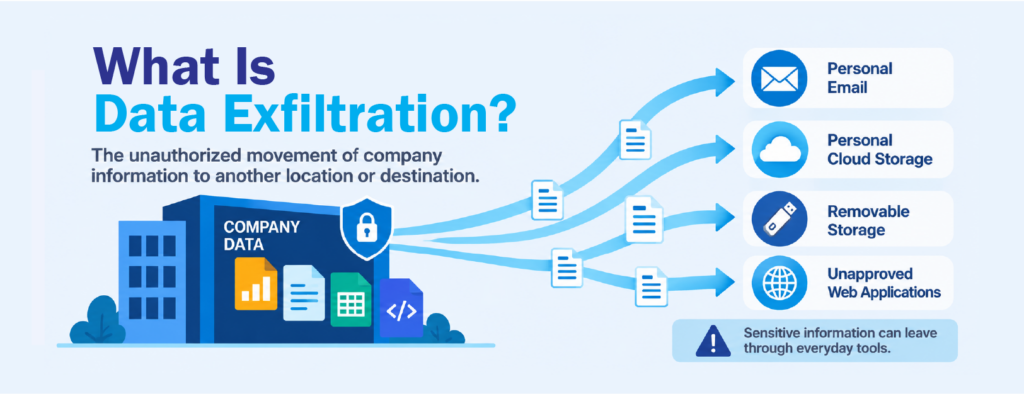
Data exfiltration is the unauthorized movement of company information outside an organization’s approved environment.
It is often linked to cyberattacks, but an attacker is not always involved. Anyone with legitimate access can move data somewhere it is not supposed to go, whether on purpose, by accident or out of habit.
During an employee departure, data exfiltration can look like:
- sending company files to a personal email address;
- uploading documents to a personal cloud account;
- copying files to a USB drive or other removable storage;
- sharing corporate cloud files with external accounts;
- pushing source code through Git or other development tools; or
- uploading files through a web browser.
In most of these cases, opening the file is not the unusual part. The employee may work with the same documents every week. What changes is where the information goes next.
How DLP Puts Guardrails Around Sensitive Data
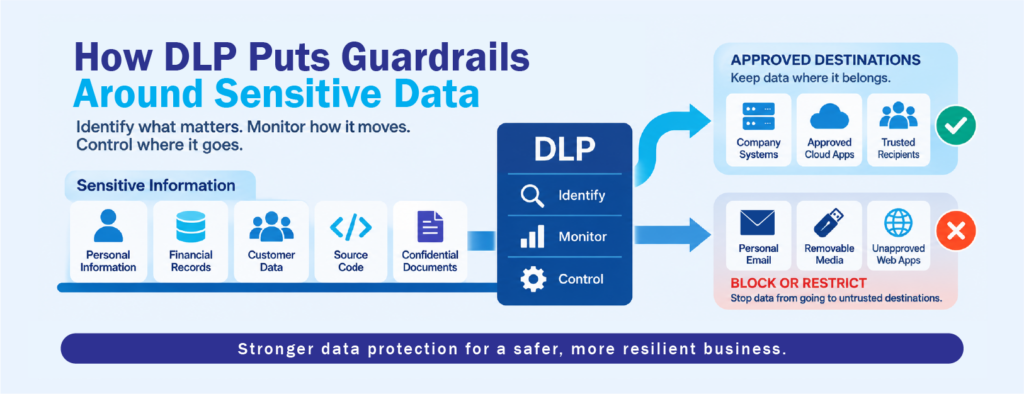
DLP helps organizations set rules around information they already know needs protection. A business can define policies for customer data, financial records, personally identifiable information and confidential documents. When activity matches those rules, the DLP solution applies the right control.
Depending on the technology in place, DLP can help:
- identify sensitive or regulated information;
- monitor how that information is handled;
- block or restrict transfers that violate policy; and
- keep records that security teams can review.
This is what makes DLP so valuable for compliance and for protecting well-defined data such as payment details or personal information. When the organization knows what it needs to protect and how that information should be handled, DLP enforces those decisions consistently.
Employee departures bring up a different question, however. What happens when the file that matters most does not match any rule?
Why Ordinary Files Make Data Exfiltration Harder to Spot
Not every valuable file carries an obvious marker. An account manager’s client presentation, an engineer’s project folder, an internal pricing sheet or years of proposal templates may not contain anything a policy would recognize as sensitive. To the business, though, they can be worth a great deal.
The activity around them can look just as ordinary. Downloading, editing and organizing documents is part of normal work, especially during a handover.
This is why data exfiltration cannot always be judged by the file alone. A project document moving between corporate systems is routine. The same document going to removable media or a personal cloud account is a different story, even though the file itself has not changed.
In those situations, the movement often says more than the content does.
Traditional DLP Enforces Rules. Incydr Watches the Movement.
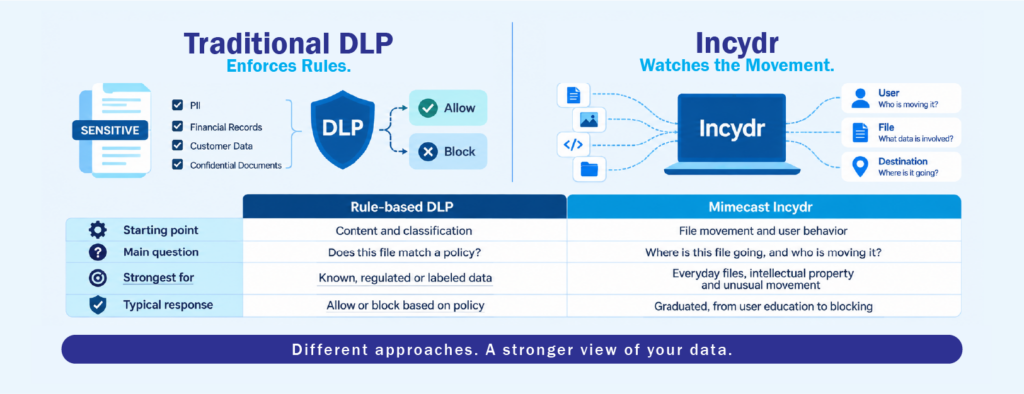
This is where Mimecast Incydr takes a noticeably different approach to data loss prevention.
A traditional DLP deployment usually starts with the data. Files are classified, policies are written and the tool acts when content matches a rule. That works well for information the organization has already defined. It also means protection depends on the rules being complete and current, and on files being recognized as sensitive in the first place.
Incydr starts with the movement instead. It monitors file activity across endpoints, browsers, corporate cloud services and email, and it does not need every file classified or content policies written before it can show where data is going. Rather than asking only whether a file matches a rule, it looks at file movement to untrusted destinations and highlights the events that carry the most risk.
For departing employees, that difference is significant. A folder of project files copied to a USB drive may never trigger a content rule because nothing inside it looks sensitive. Incydr can still surface the event, because files moved from a trusted company source to an untrusted destination, moved by a user who is on their way out. In practice, that is often what data exfiltration looks like: ordinary files with unusual movement.
3 Questions That Reveal Data Exfiltration Risk
Incydr looks at every file event through three questions. What data is involved? How is it moving, whether to a USB drive, personal cloud, personal email or a website? And who is moving it? Risk indicators built on these three dimensions bring the events that matter to the top, so investigators don’t have to dig through routine file activity by hand. They point to potential risk, not proof of wrongdoing.
For departing employees, that attention can be narrowed further. Organizations can place these employees on Watchlists, and the lists can be filled automatically through HR and ticketing integrations. That way, closer monitoring begins as soon as a departure is recorded. Because file activity history is kept, security teams can also look back at what happened before the resignation was known.
The response can then fit the situation. An accidental upload may only need a short training lesson. An externally shared link can be revoked, and higher-risk activity can be blocked outright. Keeping the response proportionate protects company data without slowing down the handover.
DLP is still an important part of protecting sensitive information. But data exfiltration doesn’t always involve a file that has already been labeled sensitive. Sometimes the warning sign is the movement itself. The same project files mean one thing when they move between company systems and something else when they head to a USB drive in someone’s last week. For organizations reviewing how they protect information across the employee lifecycle, CT Link can help assess where DLP, Incydr and existing controls fit together.
Frequently Asked Questions
What is the difference between DLP and data exfiltration detection?
Traditional DLP enforces policies on data the organization has defined as sensitive. Data exfiltration detection, the approach Incydr takes, focuses on how files move and who moves them. This helps reveal risky movement of files that no policy was written for.
Why are departing employees a data exfiltration risk?
They usually keep legitimate access until their last day, and many feel a sense of ownership over files they created. Together, these make risky movement easy to miss among normal handover work.
Does monitoring data exfiltration mean treating employees as suspects?
No. Good insider risk management looks at potential risk, not assumed intent. Many events turn out to be honest mistakes, and a proportionate response, such as a short training lesson, is often enough.