
Every organization has some version of a password policy. It usually covers length requirements, complexity rules, and maybe a reset schedule. On paper, it looks like the basics are handled.
But there’s a gap in most password policies that doesn’t get nearly enough attention, and attackers know exactly where it is. It’s not about how strong your passwords are. It’s about how many times the same password gets used across different accounts. Password reuse is the single largest credential risk most organizations face, and no amount of complexity rules will fix it.
A 2025 study by Cybernews analyzed over 19 billion recently leaked passwords. Of those, 94% were reused or duplicated across multiple accounts. Only 6% were unique. That means almost every credential an attacker finds can open more than one door.
How Credential Stuffing Turns One Breach Into Many
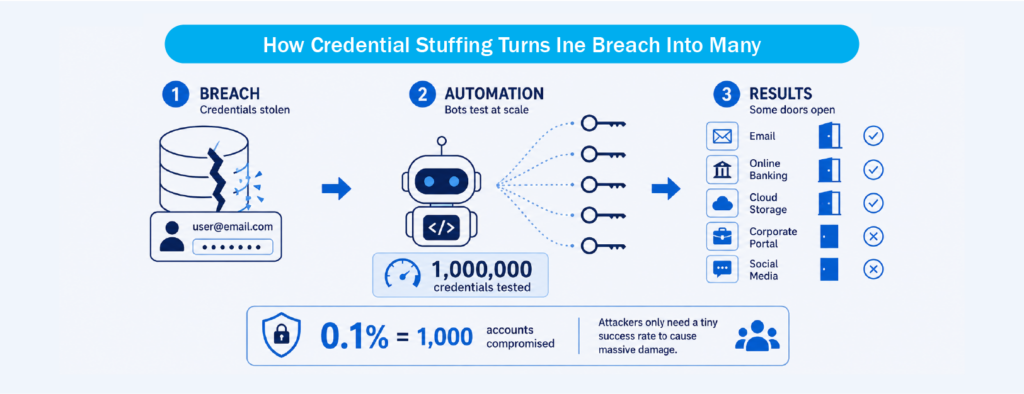
Credential stuffing is a type of cyberattack where stolen username and password pairs from one breach are automatically tested against login pages on other websites and services. It’s not the same as brute force, where attackers guess random combinations. With credential stuffing, the passwords are already known. The only question is which other platforms they unlock.
The process is straightforward. Attackers buy or download large lists of leaked credentials, often called combolists, from dark web marketplaces or criminal forums. These lists are sorted by service type, geography, or domain. Automated tools then test those credentials against thousands of login pages at scale, rotating through proxy servers to avoid detection.
What makes this attack so effective is the math. Even a success rate as low as 0.1% yields roughly 1,000 compromised accounts when tested against a list of one million credentials. When billions of credentials are in circulation, the numbers work heavily in the attacker’s favor. According to Verizon’s extended credential stuffing analysis accompanying the 2025 Data Breach Investigations Report (DBIR), credential stuffing accounted for a median of 19% of all daily authentication attempts across the organizations studied, rising to 25% in enterprise-sized companies.
Why Telling Employees “Don’t Reuse Passwords” Doesn’t Work
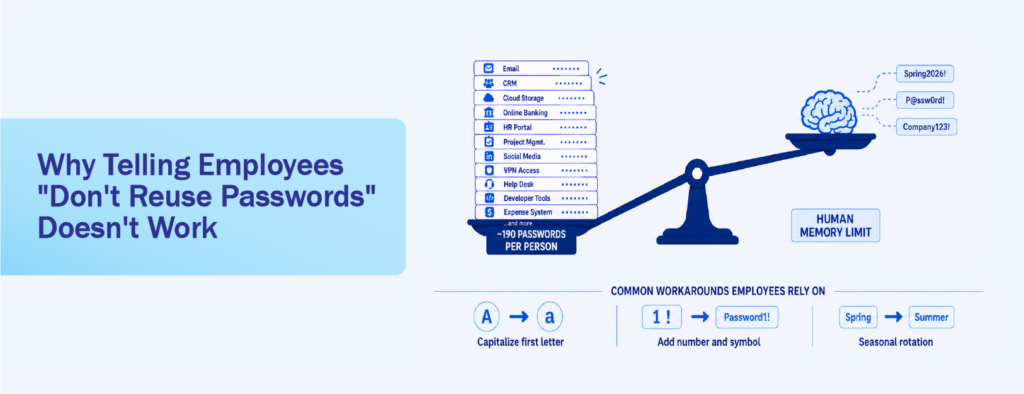
Most password policies include a line about not reusing passwords across accounts. The problem is that this rule depends entirely on employee willpower, and the math is working against them.
According to NordPass’s 2026 research, the average person manages approximately 120 personal passwords and 67 work-related passwords. That’s nearly 190 credentials to keep track of. Expecting anyone to create and remember a unique, strong password for each one, without any tools to help, is not realistic. Research from DemandSage found that employees reuse the same password an average of 13 times, and 84% of people reuse passwords across platforms.
The root cause is straightforward: complex passwords are hard to memorize. When a policy demands uppercase letters, numbers, symbols, and 12 or more characters, most people can’t hold more than a handful of those in memory. So they do one of two things. They either simplify and reuse the same password everywhere, or they write their credentials down. Sticky notes on monitors, text files on desktops, notes apps on personal phones, or shared spreadsheets become unofficial password managers. These workarounds create their own risks, because anyone who sees that sticky note or opens that file now has access to the credentials on it.
The patterns that follow are predictable. People capitalize the first letter, add “1!” at the end, or rotate through minor variations like “Spring2026!” becoming “Summer2026!” Attackers already account for these patterns. When Cybernews analyzed the 19 billion leaked passwords, they found that 27% consisted of only lowercase letters and digits, and 42% were between 8 and 10 characters long. These are the exact patterns that credential stuffing tools are built to exploit.
A written policy that says “use unique passwords” without providing a mechanism to make that possible is a policy that exists on paper but not in practice.
The Domino Effect: From Personal Account to Corporate Breach
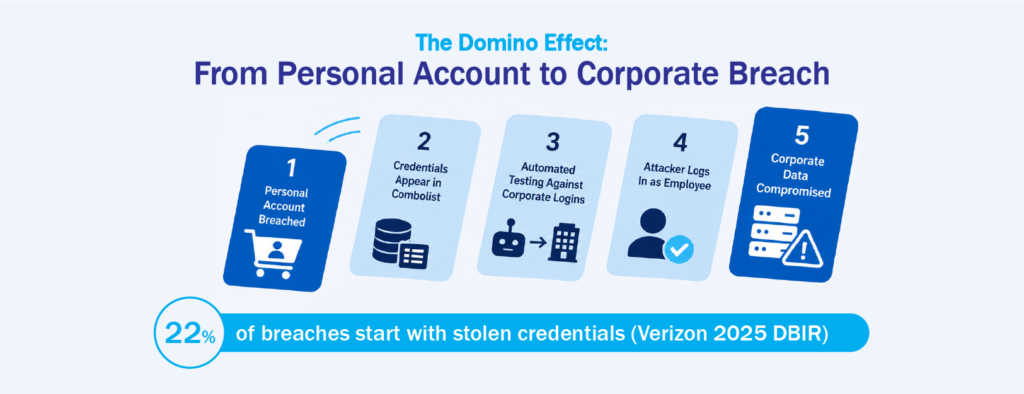
One of the most underestimated risks in password security is the connection between personal and corporate credentials. When an employee uses the same password for a personal shopping account and their work email, a breach at the retailer puts the corporate account at risk.
The Verizon 2025 DBIR found that stolen credentials were the initial access vector in 22% of all confirmed breaches, making it the most common entry point for the second consecutive year. In basic web application attacks specifically, 88% involved stolen credentials. The connection to ransomware is direct: among ransomware victims studied in the report, 54% had prior credential exposure in infostealer logs before the attack occurred.
Infostealer malware, which is software designed to harvest saved passwords, cookies, and autofill data from browsers, has become a primary supply line for credential theft. The 2025 DBIR found that 30% of corporate-managed devices and 46% of unmanaged devices appearing in infostealer logs contained company credentials. That means nearly half of compromised personal devices were carrying corporate login data alongside personal logins.
The risk escalates significantly when the compromised account belongs to an administrator. A regular employee account might expose one department’s files or a single application. But an admin account typically has elevated privileges across the entire organization, including access to user directories, system configurations, security settings, and sensitive business data. If an attacker gains control of an admin credential through reuse or credential stuffing, they can disable security controls, access confidential records across departments, create backdoor accounts, and cause widespread operational disruption. One compromised admin account can affect every user and system in the organization.
The domino effect works like this: one personal account gets breached, the credentials appear in a combolist, automated tools test them against corporate login pages, and the attacker walks in through the front door using a legitimate username and password. From there, the activity looks like a normal user session, which makes detection much harder.
What a Password Policy Needs Beyond Written Rules
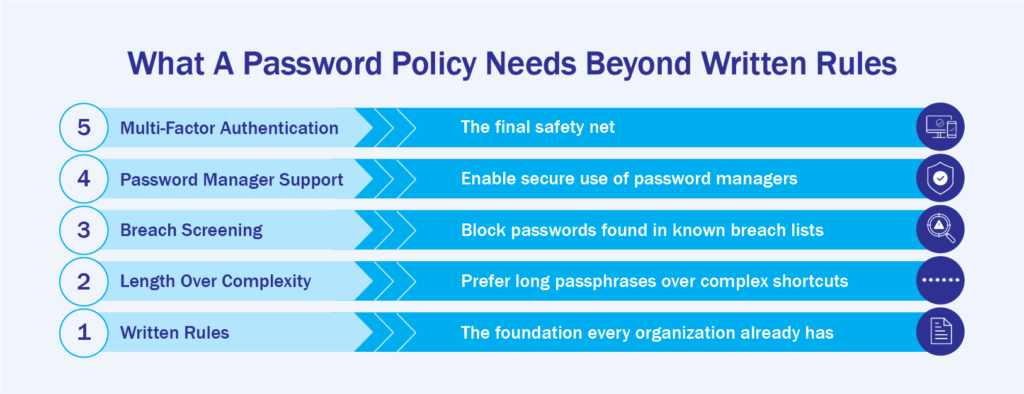
A password policy that only sets rules without providing tools to enforce them will always have gaps. The National Institute of Standards and Technology (NIST) addressed this directly when it finalized Special Publication 800-63B Revision 4 in July 2025. Among the most significant changes, NIST now explicitly requires systems to support password managers by allowing paste and autofill functionality.
This is a meaningful shift. NIST is acknowledging that expecting users to manually create, remember, and type unique passwords for every account is not a workable security model. Password managers solve the reuse problem mechanically: they generate a unique, random credential for every account, store it in an encrypted vault, and auto-fill it when needed. The user only needs to remember one master password.
NIST’s updated guidance also requires organizations to screen new passwords against known breach databases. If someone tries to set a password that has already appeared in a data breach, the system should reject it and explain why. This is a direct defense against credential stuffing, because it prevents employees from using credentials that attackers already have in their combolists.
Single Sign-On (SSO) adds another practical layer by reducing the number of passwords employees need to manage in the first place. With SSO, employees authenticate once through a central identity provider and gain access to multiple connected applications without logging in separately to each one. This directly reduces the temptation to reuse passwords, because there are fewer passwords to create and remember. SSO also gives IT teams centralized visibility into who is accessing which applications, and makes it easier to revoke access immediately when someone leaves the organization or changes roles. When paired with Multi-Factor Authentication (MFA), SSO significantly narrows the window for credential-based attacks.
MFA, which adds a second verification step so that a stolen password alone isn’t enough to gain access, remains one of the most effective controls available. Microsoft’s Digital Defense Report 2025 confirmed that more than 97% of identity attacks are password attacks, and MFA remains the single most effective control against them.
How an Enterprise Password Manager Closes the Reuse Gap
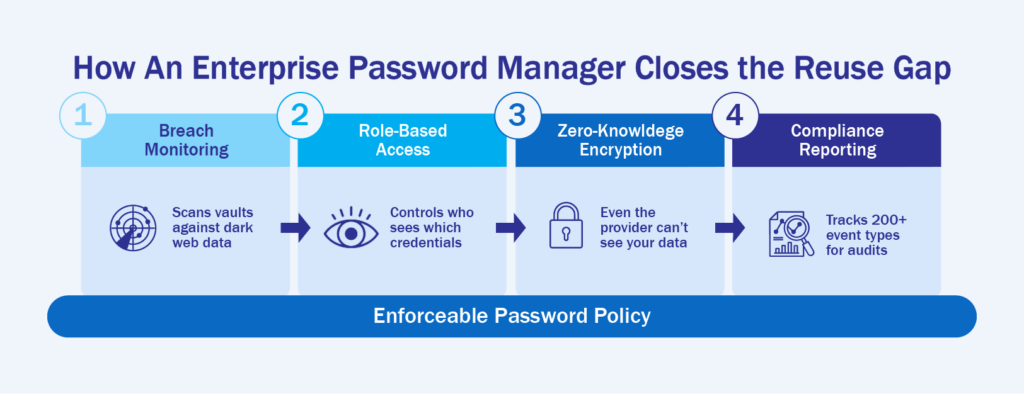
The sections above paint a clear picture: written rules alone can’t stop password reuse at scale. When the average employee manages nearly 190 credentials and reuses the same password 13 times, the gap between policy and practice is too wide for training or memos to close. That’s where an enterprise password manager becomes the enforcement layer your password policy is missing.
Instead of asking employees to come up with unique passwords on their own, an enterprise password manager generates a random, high-strength credential for every account and stores it in an encrypted vault. When employees need to log in, the password auto-fills. They never need to see, type, or remember the actual credential. That single change eliminates the core reason reuse happens: people reuse passwords because they can’t remember unique ones for every account.
Keeper is built specifically for this problem. Its BreachWatch feature continuously scans every credential stored in employee vaults against dark web breach data, alerting both the user and the IT administrator when a match is found so the password can be changed before an attacker exploits it. Beyond breach monitoring, Keeper gives IT teams granular control through Role-Based Access Control (RBAC), which defines exactly who can access which credentials based on their role, and a zero-knowledge architecture where all vault data is encrypted on the user’s device, meaning even Keeper itself cannot access your passwords.
For organizations that need to demonstrate compliance, Keeper’s Advanced Reporting and Alerts Module (ARAM) tracks over 200 event types, from weak password usage to disabled Multi-Factor Authentication (MFA), and integrates with Security Information and Event Management (SIEM) platforms like Splunk or Microsoft Sentinel for audit-ready reporting.
The goal isn’t just to store passwords. It’s to make your password policy enforceable without adding friction to daily work.
Interested in learning more about Password Policy gaps and solutions like Keeper that can help businesses resolve this? Contact us at marketing@ctlink.com.ph to set up a consultation with us today!